ERP for Manufacturing: Software That Fits Your Process, Not the Other Way Round
Short answer: Most manufacturing ERP projects fail not because the software lacks features, but because the software cannot be shaped around how the plant actually works. Open-source ERPNext is customisable at four distinct levels — fields, forms, logic and whole modules — which means a fabrication shop, a food processor and an electronics assembler can run genuinely different processes on the same core. The discipline is knowing which level to use, because the cheapest customisation to build is often the most expensive one to live with.
Ask a plant manager why the last ERP rollout went badly and you will rarely hear "it was missing a feature." You hear something closer to this: we had to change how we work to suit the system. The route card got simplified because the software only allowed one operation sequence. The quality check moved to the end because there was nowhere to record an in-process inspection. Subcontracting got handled in a spreadsheet because the module assumed you ship material and get the same material back.
None of those are feature gaps. They are fit gaps. And fit is the whole game in manufacturing, because no two plants convert inputs to outputs the same way — even inside the same industry, even inside the same group.
This guide covers what "customisable" genuinely means in a manufacturing ERP, the four levels at which you can bend the system, which manufacturing processes need which level, and — the part most vendors skip — where customisation quietly becomes technical debt you will pay for at every upgrade.
Why standard manufacturing ERP fits so badly
Mainstream ERP products encode a reference process. That reference is usually drawn from large, repetitive, discrete manufacturing — the world of stable BOMs, long production runs and formal engineering change control. It is a perfectly good model, and it describes almost none of the mid-market.
The mid-market looks like this instead:
- A job shop where every order is effectively a new product, and the BOM is created after the drawing is approved.
- A process manufacturer where output is measured in kilograms, yield varies by batch, and the "recipe" changes with the moisture content of the raw material.
- An assembler who buys 400 components, subcontracts plating on three of them, and needs to know landed cost per unit including the freight on a shared container.
- A fabricator who quotes from a drawing, revises it twice during production, and bills on measured quantity rather than ordered quantity.
A closed system handles the first case well, the second awkwardly, and the third and fourth through consultants and bolt-ons. An open system handles all four — if, and only if, you customise it deliberately rather than reflexively.
The four levels of customisation
"Customisable" is used so loosely in ERP sales that it has stopped meaning anything. It is more useful to think in levels, because each one has a very different cost, risk and upgrade profile.
| Level | What it changes | Upgrade risk | Who does it |
|---|---|---|---|
| 1. Configuration | Custom fields, naming series, print formats, dashboards, permissions | Near zero | A trained key user |
| 2. Process | Workflows, approval chains, notifications, assignment rules | Low | A functional consultant |
| 3. Logic | Scripts that validate, calculate or auto-create documents | Moderate | A developer |
| 4. Extension | New doctypes and whole custom apps | Managed, if isolated | A development team |
Level 1: configuration
This is where the majority of manufacturing "customisation" should land, and where most projects underuse the system. You can add a heat-number field to a stock entry, a drawing revision to an item, a customer part number to a sales order line, or a gauge reading to a quality inspection — all without writing code, and all surviving upgrades untouched.
Print formats matter more than they sound. A fabrication shop's job traveller, a food processor's batch record and an exporter's packing list are not cosmetic documents — they are the paperwork the floor and the customs broker actually use. Being able to build them yourself, against your own field set, removes a whole category of vendor dependency.
Level 2: process
Workflow is where your governance lives. A purchase order above a threshold needs two approvals; a production order cannot start until the drawing is released; a material issue against a closed work order needs a supervisor override. These are rules about who may do what, when — and they are configuration, not code.
The common mistake is to build these as scripts because a developer was in the room. Workflow state machines are visible, auditable and adjustable by the business. A script doing the same job is invisible to everyone except the person who wrote it.
Level 3: logic
Scripts are where genuine manufacturing peculiarity gets handled. Some real examples:
- Yield-adjusted consumption. A process manufacturer whose output depends on incoming moisture can calculate required input quantity at work-order creation rather than accepting a fixed BOM quantity.
- Measured-quantity billing. A fabricator who bills on actual fabricated weight can have the sales invoice pull the measured figure from the production entry instead of the ordered figure.
- Grade-based pricing. Where selling price depends on a tested property — purity, tensile strength, grade — the invoice rate can be derived from the quality inspection result.
- Cross-document validation. Blocking a delivery note when the linked quality inspection has not been submitted, or when a batch has passed its retest date.
This is the level where discipline starts to matter. Every script is a promise you have made to yourself to maintain code forever. Write them, but write few, and document why each one exists.
Level 4: extension
Occasionally a business genuinely needs a concept the ERP does not have. A tool-and-die maker needs a tool life register. A plastics moulder needs mould maintenance tracked against shot count. A rolling mill needs coil genealogy that survives slitting and re-coiling.
These are not fields on an existing form; they are new objects with their own lifecycle. Built as a separate app rather than as edits to core files, they can be version-controlled, tested and carried across upgrades as a unit. Built as core edits, they turn every future upgrade into a merge conflict.
The rule that saves the most money: always solve at the lowest level that works. A custom field beats a script. A workflow beats a script. A script beats a new doctype. A new doctype beats forking the core. Teams that invert this order end up with a system only one person understands.
What ERPNext gives a manufacturer before any customisation
It is worth being clear about the starting point, because a good deal of customisation gets built to replace functionality that was already there and simply not switched on.
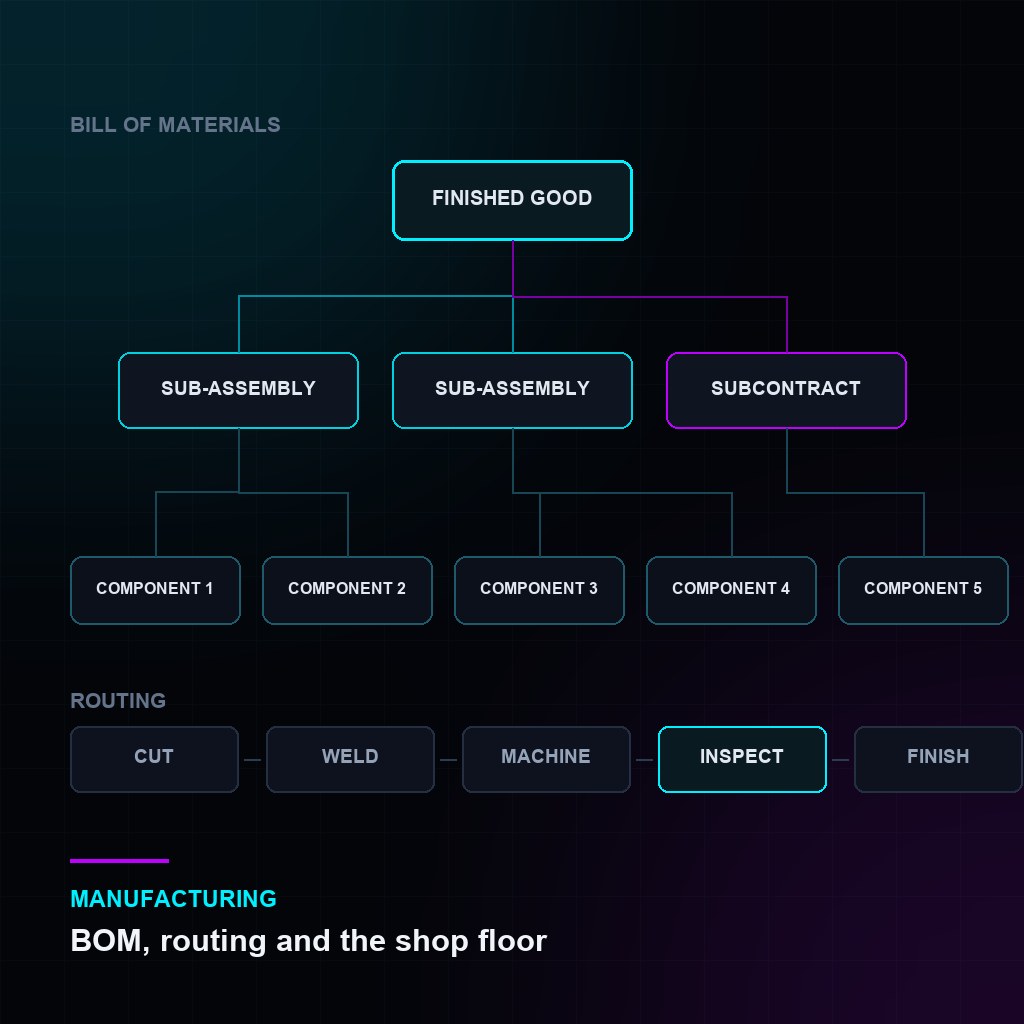
- Multi-level BOMs with sub-assemblies, scrap items, operating cost and BOM-level costing.
- Routing and operations — workstations, operation times and job cards for shop-floor reporting.
- Work orders with material transfer against the order, backflush or manual consumption, and partial completion.
- Production planning that reads sales orders and stock projections and proposes work orders and purchase requests.
- Subcontracting that ships components to a vendor and receives a different item back, keeping the value with your books rather than theirs.
- Batch and serial tracking, including expiry, with full traceability from raw goods receipt to delivery.
- Quality inspection at incoming, in-process and outgoing stages, with parameter templates and acceptance criteria.
- Costing with FIFO or moving average, landed cost vouchers for freight and duty, and work-in-progress accounts.
That is a serious baseline. The honest caveat is that finite-capacity scheduling, advanced planning and optimisation, and deep MES-style machine integration are not core strengths — plants that genuinely need those usually run a specialist system alongside the ERP and integrate the two.
A worked example: a make-to-order fabrication shop
Consider a shop that fabricates structural steel assemblies to customer drawings. Nothing is made twice. Here is how the levels combine in practice.
| Requirement | How it is met | Level |
|---|---|---|
| Quote from a drawing before a BOM exists | Quotation with estimated weight and rate per kg; drawing attached | 1 |
| Drawing revision must be visible on the floor | Custom revision field on item and work order, printed on the job traveller | 1 |
| No cutting before drawing release | Workflow: work order stays Draft until Engineering approves | 2 |
| Plating sent out and returned | Standard subcontracting flow | 0 |
| Bill on fabricated weight, not ordered weight | Script pulling measured weight into the invoice line | 3 |
| Mill certificates traceable per assembly | Batch tracking with heat number; certificate attached to the batch | 1 |
Six requirements, one script. That ratio is what a well-run implementation looks like. When the ratio inverts — six scripts and one configuration change — someone has been solving at the wrong level.
Where customisation turns into debt
Customisation is not free, and the bill does not arrive during the project. It arrives eighteen months later, at the first major upgrade. Four patterns cause most of the pain:
- Editing core files instead of extending them. Every core edit must be re-applied and re-tested at each upgrade. Extensions in a separate app do not.
- Automating a broken process. If the approval chain is wrong, encoding it in software makes it permanent. Fix the process first; automate second.
- Undocumented scripts. A validation nobody can explain becomes a rule nobody dares remove. Comment every script with the business reason, not the mechanics.
- Customising during the first three months. Teams customise hardest when they understand the system least. Run standard where you can, list the friction, and revisit after a full cycle — a surprising share of the list resolves itself.
Compliance is not optional, and it is moving
Whatever you customise, the statutory layer has to hold. For manufacturers in the markets we work across, the current picture is:
- India: GST with e-invoicing (IRN and QR code) and e-way bills for goods movement — unavoidable for any manufacturer above the turnover threshold.
- UAE: 5% VAT and corporate tax, with a phased e-invoicing mandate on the way — systems need to be able to emit structured invoice data, not just a PDF.
- Saudi Arabia: ZATCA e-invoicing is live and in its integration phase, with cryptographic stamping and clearance requirements.
- Oman, Qatar, Kuwait, Bahrain: VAT regimes at various stages, with e-invoicing programmes announced or progressing.
The practical test when evaluating any ERP: can it produce the structured data the tax authority wants, and can that keep working after you have customised the invoice? If compliance lives in a hard-coded print format, the answer is usually no.
A selection checklist for manufacturers
If you are evaluating systems now, these questions separate genuinely adaptable software from software that merely markets itself that way:
- Can we add a field to a production document ourselves, without the vendor and without a release cycle?
- Can we design our own job traveller and batch record, or must the vendor build every document?
- Can we express our approval rules as visible workflow states rather than hidden code?
- When we extend the system, does the extension survive an upgrade — and can we test that before upgrading production?
- If we part ways with our implementation partner, do we still have the database, the code and the ability to appoint someone else?
- Does the statutory output remain valid after our customisations?
That last-but-one question is the one most worth asking out loud. With open-source ERP the answer is structurally yes — you hold the data and the code. With closed systems it depends entirely on contract terms, and those are worth reading before signing rather than after.
Frequently asked questions
Will customisation break our upgrades?
Not if it is done as extension rather than modification. Custom fields, workflows and separate apps carry forward. Direct edits to core files do not, and are the single most common cause of stalled upgrades.
How much customisation is normal for a manufacturer?
In a healthy project most requirements are met by configuration, a handful by workflow, a small number by scripts, and rarely more than one or two by new modules. If the specification is mostly scripts, the process design needs another look before development starts.
Can it handle process manufacturing, not just discrete?
Yes, with attention to setup — batch tracking, variable yield, co-products and by-products, and quantity in weight or volume rather than pieces. Recipe-driven manufacturing generally needs more configuration work than assembly, and sometimes a yield script.
What about machine data and shop-floor terminals?
Job cards can be operated from a tablet on the floor, which covers manual reporting well. Direct machine integration is an integration project rather than a configuration exercise, and should be scoped as one.
How long does a manufacturing implementation take?
For a single plant with clean master data, a focused rollout typically runs in months rather than weeks — the pacing item is almost always item master, BOM accuracy and opening stock, not software configuration.
The bottom line
Manufacturing is the domain where ERP fit matters most, because the process is the business. A system you can shape — at the right level, with restraint — lets you keep the practices that make you competitive instead of trading them for someone else's reference process.
The goal is not maximum customisation. It is the minimum customisation that lets the plant run the way it actually runs, on a foundation that still upgrades cleanly in three years.